Home inventory for iPhone

Your home,
on record.

Photos and saved item details,
organized by room.

Start with one room and three things you want on record.

12 items. 2 rooms. Free, with no time limit.

No HomeTally account. Private on your iPhone by default.

An actual HomeTally Coffee Maker record with its photo, name and saved details
Coffee MakerExample inventory
One home. Many details.See how they fit together

A useful record, whenever you need it

Familiar things.
Details worth keeping.

01 / Saved with the item

More useful
than a photo alone.

Add a name, brand, model number and notes to the item. Keep the details you have now and fill in the rest when you find them.

Photos and saved item details are included in Free.

What to save for an appliance
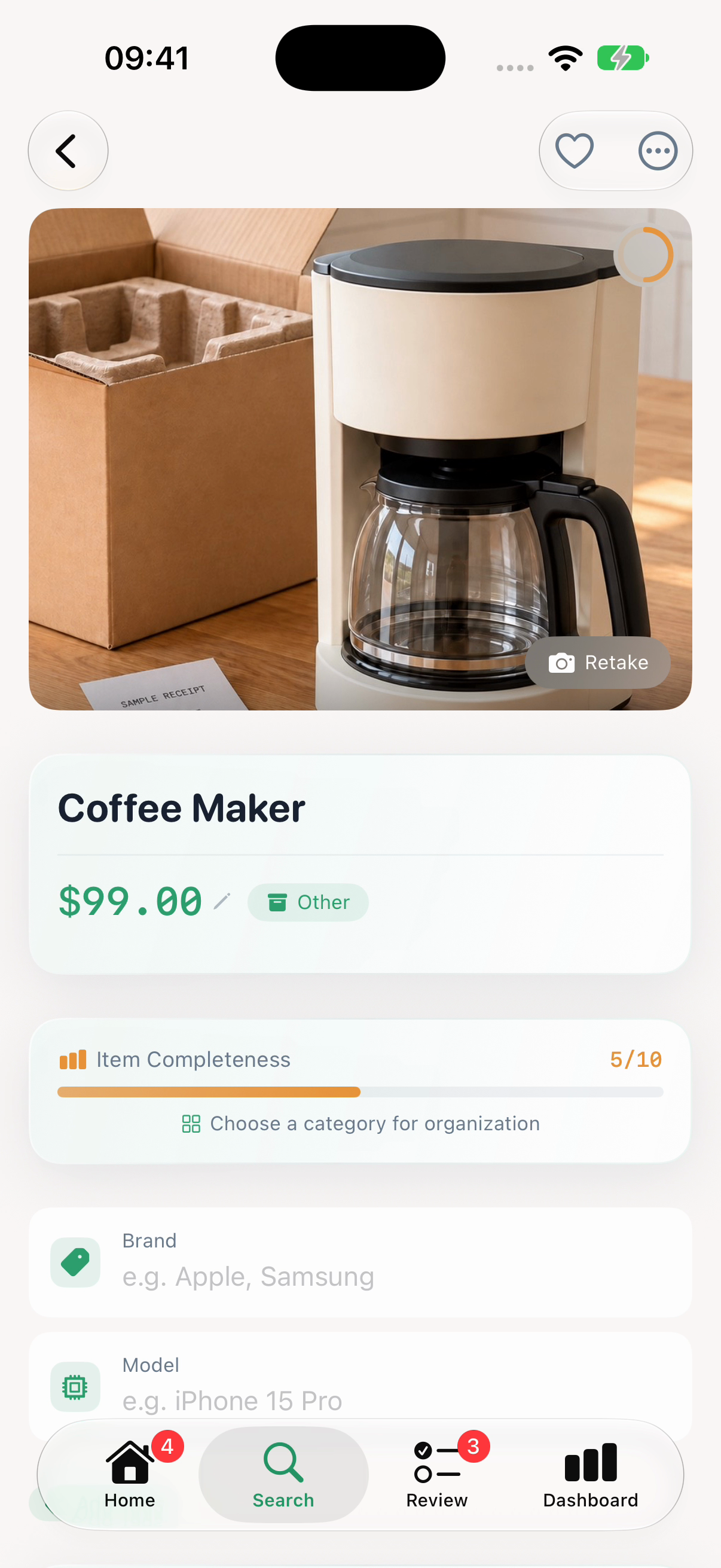
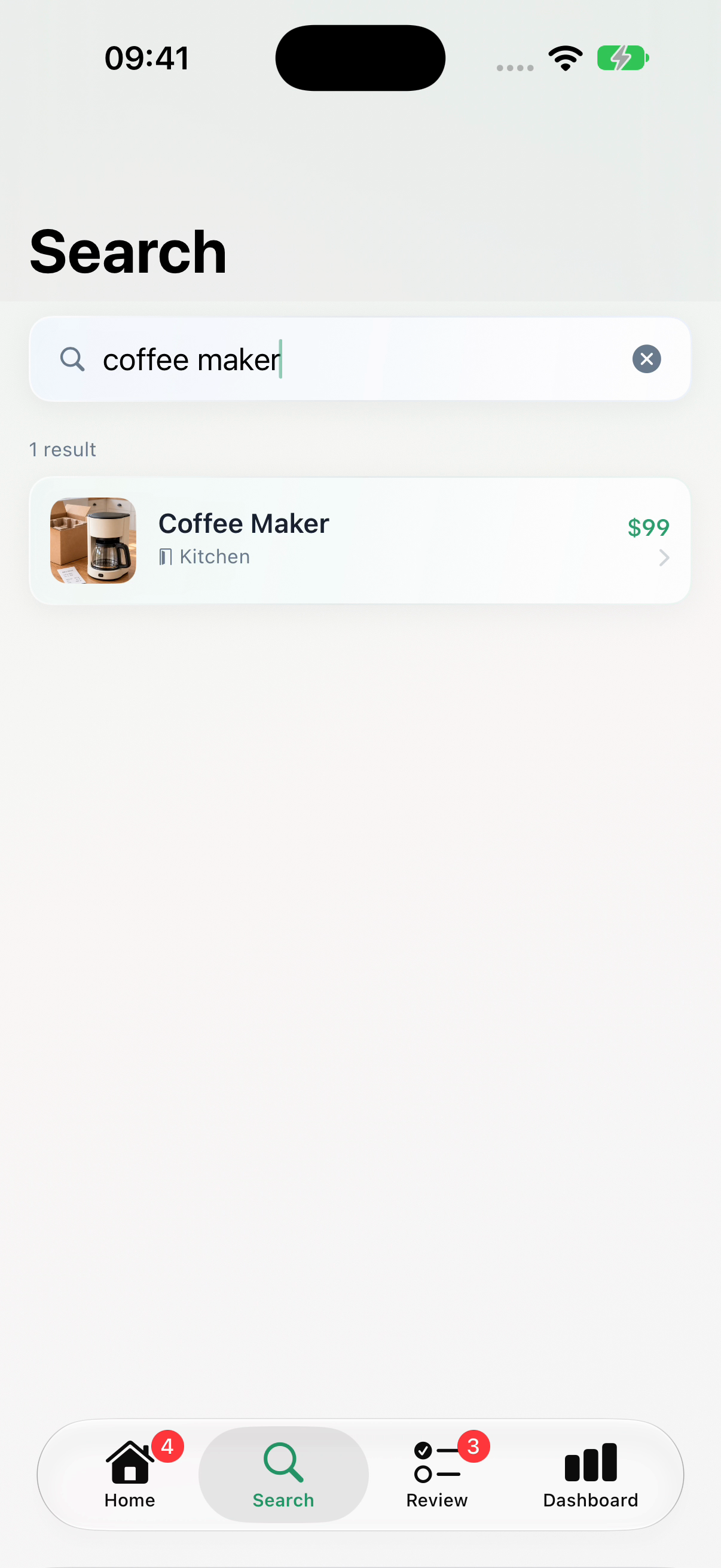
Coffee Maker item record in HomeTally, using fictional example inventory
Example inventory

03 / Receipts & warranties · Premium

Keep the receipt
with the item.

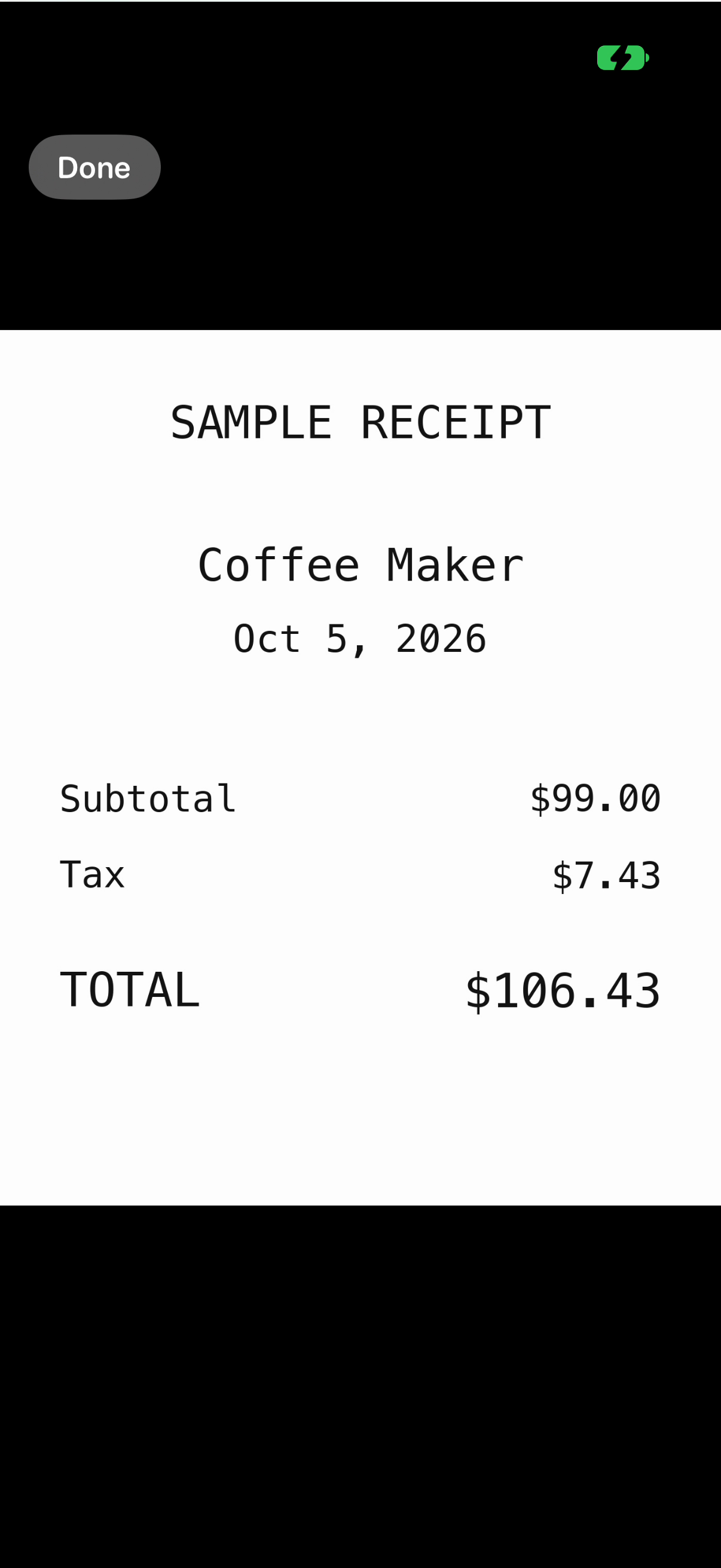
Attach a receipt to its item instead of leaving it loose in your camera roll. Add the purchase details and warranty expiration date while you have them.

Receipt attachments and warranty tracking require Premium.

Keep original purchase documents separately when you need them. A saved warranty date does not determine coverage.

HomeTally's receipt viewer showing a fictional Coffee Maker receipt dated October 5, 2026, total $106.43
Premium · Sample receipt

A small start is a useful start

One room.
Three things.

Choose a few belongings you want on record. Add a photo and a name in HomeTally, then fill in the details you have. You can come back for the rest.

Make your starter list

No account or email. Make a list you can print.

Free to start

Start with a few.
Keep going with Premium.

Free

Your first useful records.

$0 no time limit

One property, two rooms, twelve items and three custom tags.

  • Photos and saved item details
  • Photo-assisted capture and manual entry
  • Search, value estimates and risk profiles
Start free on iPhone

Premium

The rest of your home.
The paperwork, too.

$2.99per month

$29.99billed annually
about 16% less than monthly

  • Unlimited properties, rooms, items and tags
  • Receipts, warranty dates and lending records
  • Batch capture, Dashboard and Review Queue
  • PDF inventory reports and optional iCloud Sync
Get HomeTally

Monthly and annual Premium include the same features. U.S. App Store prices checked October 19, 2026. Prices vary by storefront and may change. Apple shows your price before purchase. Premium renews automatically until canceled in your Apple Account subscriptions.

PDF reports are readable copies, not an importable backup. Optional iCloud Sync needs setup and verification on your devices. Plan how to keep your records accessible.

Your inventory, on your terms

Private on your iPhone
by default.

No HomeTally account, ads, analytics or tracking. Photo recognition runs on your device and suggests a name and category for you to check.

Optional Premium iCloud Sync uses your own Apple Account. Check your records on a replacement device before erasing the original.

Read the privacy policy
New in 1.3.0A shorter setup. Clearer cards. Easier review.

The introduction now takes you straight to creating your home. Capture options are visible together, item names have more room, and the Review Queue shows when you last checked each record.

The Premium screen also explains the free limits, plan prices, and renewal terms in one place. Your existing inventory stays where it is.

Before you download

HomeTally stores your inventory on your iPhone by default. No HomeTally account is required, and the app includes no advertising or tracking. Optional Premium iCloud Sync uses Apple CloudKit to sync your inventory across supported devices signed into the same Apple Account.

Core cataloging, photo recognition and value estimates work offline. Purchases, optional iCloud Sync and online sharing destinations need an internet connection.

With Premium, enable iCloud Sync in Settings and close and reopen HomeTally when prompted. Use the same Apple Account and enable sync on the new device. Check that your items, photos, and receipts appear there before erasing the old phone. HomeTally does not show a sync-completion indicator. Inventory kept only on the old phone does not transfer through HomeTally automatically.

Records stored only on a lost or damaged phone may be unavailable. Set up optional Premium iCloud Sync before you need it, and save PDF reports somewhere you can access separately. A PDF is a readable copy, not a backup you can import into HomeTally. Read the preservation guide.

Yes. Start with 1 property, 2 rooms, 12 items and 3 tags, plus photo-assisted capture, manual entry, search, value estimates and risk profiles. There is no time limit. Optional Premium includes unlimited inventory, batch capture, receipts, warranties, lending, Dashboard, Review, PDF reports and iCloud Sync.

HomeTally uses the camera for capture and lets you choose photos to import. Optional location access can record where an item photo was taken. You can use manual entry without camera or location access.

Yes. Manage or cancel Premium through your Apple Account subscriptions. Paid features remain available until the end of the current billing period. HomeTally does not automatically delete your inventory when Premium ends; free limits apply to new additions.

HomeTally puts photos, rooms and searchable item details together in a visual inventory. Premium adds receipt attachments, warranty and lending records, a dashboard and shareable PDFs. Search by name, brand, model or serial number, or note when you need to find something.